The last architecture post followed an observation through ECITON-R: what a robot reports, what the system decides to share, and what another robot can do with that information.
I wanted a way to watch those ideas play out. If a robot changes direction, what did it learn? If several robots gather around the same task, did they find it independently or hear about it from a neighbor? What happens when a message never arrives?
Swarm Lab is now on the website. It is an interactive, top-down simulator for exploring movement, local task knowledge, and direct communication. You can change parameters, edit the world, and write Python behavior while watching the swarm.
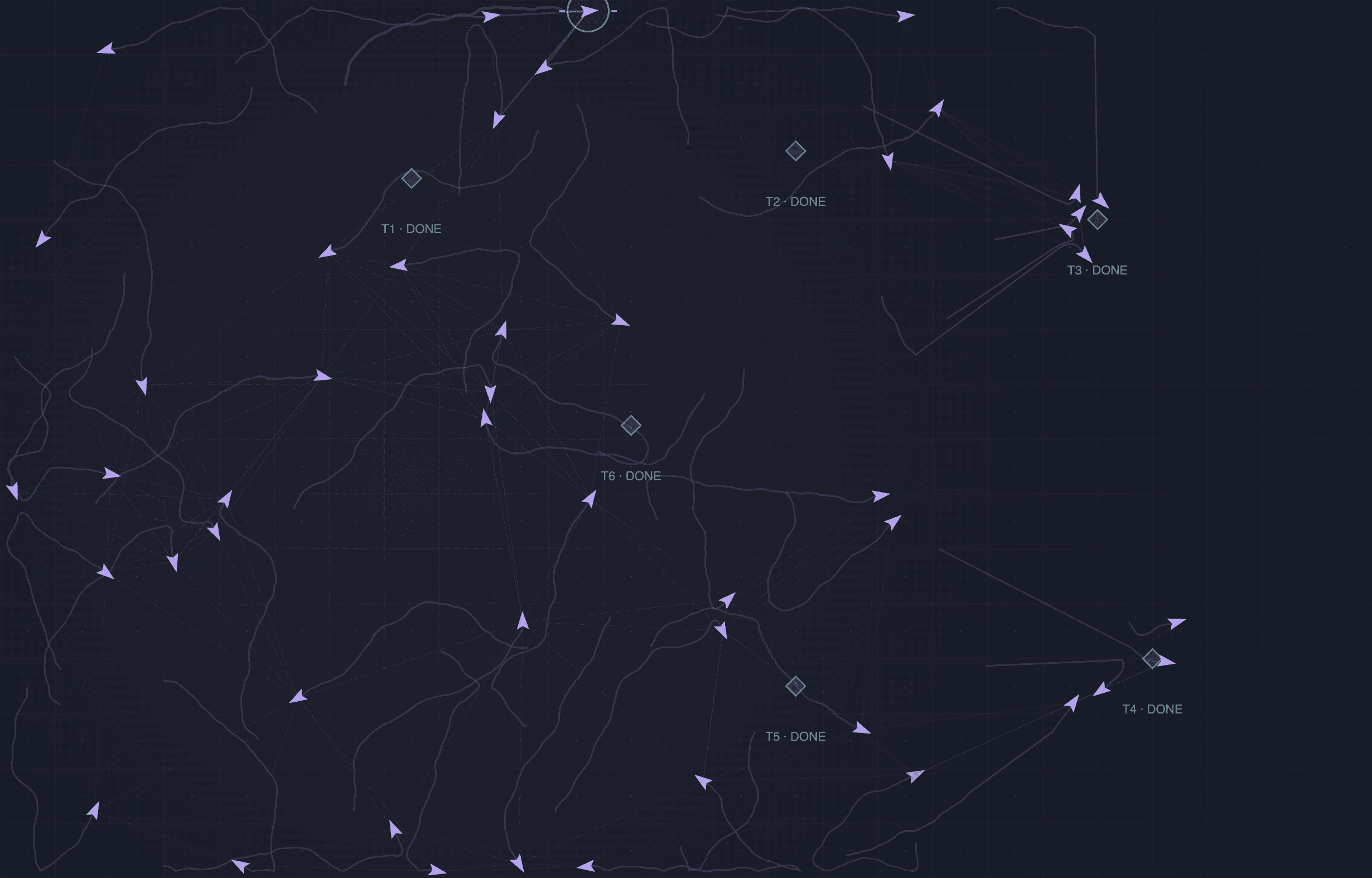
The whole arena, one robot's view
From above, you can see where every robot and task is. Each robot has a smaller view. It discovers nearby tasks through sensing and can learn about others through messages. Its task knowledge also expires, so an old observation does not stay useful forever.
That difference is the part I most wanted to make visible. A task might look obvious to someone watching the screen while a robot has no information about it yet.
In the full workspace, select a robot and open the inspector. It shows the tasks that robot knows about, whether it sensed them or received them from a neighbor, and the reason its behavior code gives for its current action. The Robot knowledge view hides unknown tasks and unsensed robots. Walls and condition overlays remain visible to help you inspect the scene.
This gives you something concrete to investigate when the swarm behaves differently from what you expected.
Start with a small change
The website preview keeps the controls close to the arena. Choose a scene, press Run, and watch. You can add a task, draw a wall, or erase an object directly in the preview. Quick settings exposes behavior, weather, movement speed, and packet loss.
The Open full workspace link brings in the rest:
- Movement rules for task seeking, flocking, and spreading out.
- Network controls for range, delay, loss, queues, message expiry, and byte budgets.
- Local areas of fog, interference, or slow ground.
- Robot inspection, packet activity, recent history, and a Python editor.
Both side panels can close when you want more room for the arena. The preview and full workspace start separate sessions, so a scene you edit in one does not automatically carry into the other.
Messages have a cost
The communication view uses the project's Python protocol and network code. Messages pass through queues and can be delayed, lost, duplicated, rejected, or arrive too late to be useful. Sending also consumes a configured byte allowance.
The workspace lets you compare periodic direct messages, sending only when task knowledge changes, and staying silent. These are fixed rules you can inspect. The current model sends directly to reachable neighbors; it does not yet forward messages across multiple hops.
Watch the packet activity alongside task progress. A line between robots shows a possible connection in the model. The delivery records tell you whether a message actually made it through.
Try sharing on and off
A useful first comparison is to keep the scene the same and change communication:
- Open the Open field scene and leave Share discoveries enabled.
- Run it, then pause at a simulated time you choose. Note task progress and message delivery.
- Reset the simulation, turn Share discoveries off, and run to the same simulated time.
- Compare where the robots travelled and which tasks they reached. Keep the other settings unchanged.
For a closer look, repeat the comparison in the full workspace and inspect what individual robots know. A robot can learn about a distant task through a successful message, but that does not guarantee the group will finish sooner. You still need to examine what changed and repeat the comparison across settings and seeds.
This is a starting point for asking better questions. It is not a reported performance result.
Change the behavior in Python
The Python editor exposes a decide(observation, parameters) function. It receives the robot's own state, nearby sensed robots, local task knowledge, and the current parameters. It returns a heading, an optional task choice, a communication preference, and a short reason.
For example, this simple policy keeps the current heading, chooses no task, and requests silence:
def decide(observation, parameters):
    return {
        "heading": observation["self"]["heading"],
        "task_id": None,
        "communicate": False,
        "reason": "Exploring without sending messages",
    }
Apply it in the editor, then press Run. The simulator still handles movement constraints and message checks. Changing the policy does not give it control of physical robots.
The website runs the same Python engine as the local playground through Pyodide, inside the browser. There is no separate JavaScript version of the swarm rules to keep in sync.
Use Save scene to keep the setup and Python source before refreshing. Export run also records the run's settings, seed, timed edits, metrics, and retained message events. The history slider reviews recent snapshots; it does not rewind the engine and start a new branch.
What this version can tell us
Swarm Lab makes the current code easier to explore and explain. Movement, weather, and energy use are abstract models. The distances and rates are simulation settings, and the energy display is an illustrative allowance. They are not measurements of physical robots, radios, or batteries.
The broader architecture still has work ahead: exclusive task claims, gossip, shared virtual markers, temporary coordinator elections, learned policies, and hardware integration. A working playground does not establish those capabilities.
For now, the useful step is being able to change a rule, see the effect, and inspect the decisions and messages behind it. That gives the next experiment a clearer starting point.