
One robot can now discover obstacles and navigate using its own map. In the new Map exploration scene, a rover starts on one side of a divider. A task is hidden on the other side. The rover senses the walls, finds the doorway, and builds a route from the free space it has observed.
That is the main change in Swarm Lab 0.8.0. The previous update covered task claims, gossip, and temporary coordinators. This checkpoint gives us a smaller navigation experiment we can watch and inspect before adding shared maps.
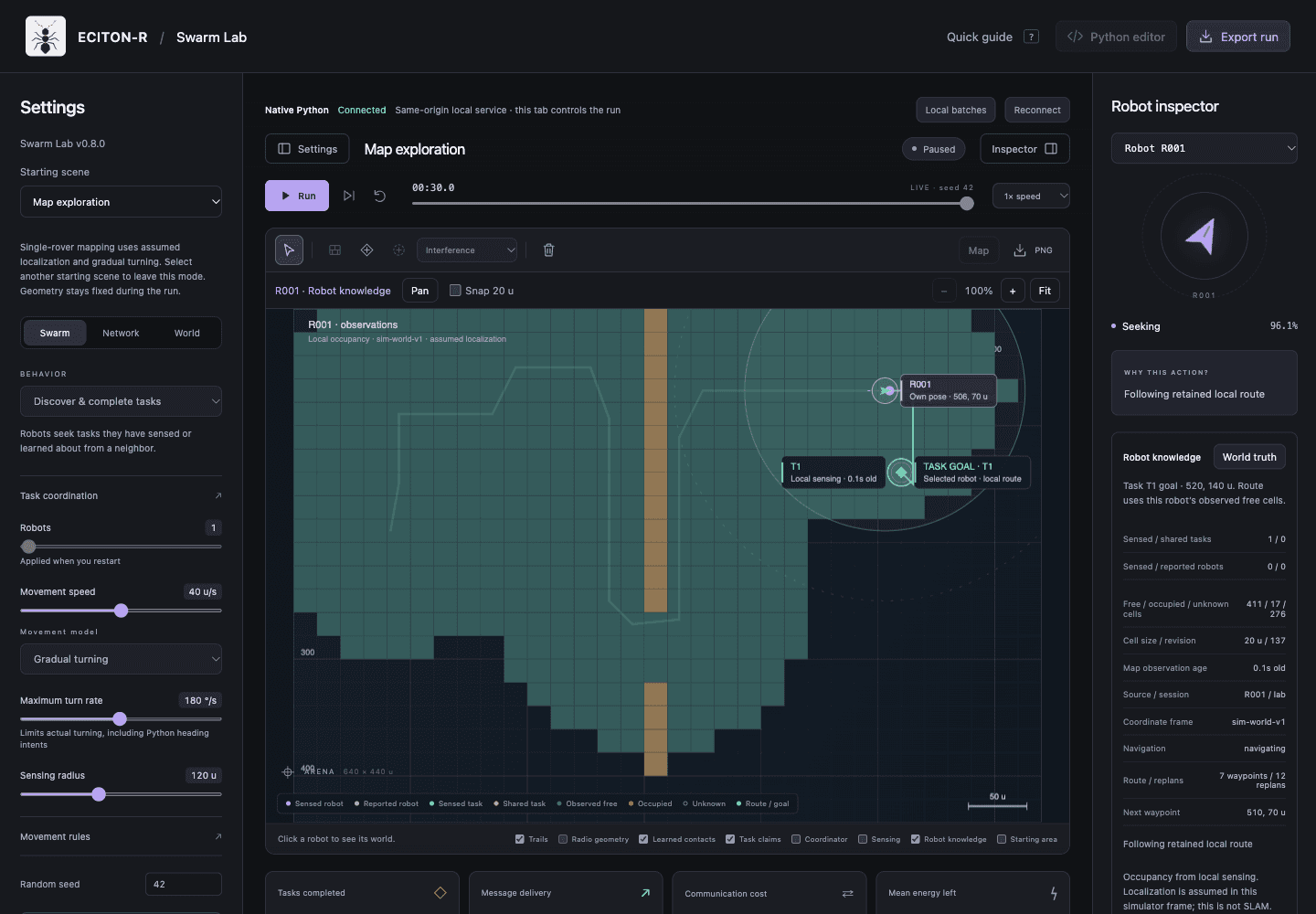 R001’s recorded knowledge map: teal cells are observed free space, amber cells are occupied, and dark cells remain unknown. The inspector shows the task goal, remaining route, map age and source.
An actual paused run from the local Native Python workbench. The rover has found the doorway and discovered T1 beyond the divider. The screenshot shows its retained observations; the faint trail shows where it travelled. This is a simulated scene with assumed localization.
The arena and the robot's map
From above, it is easy to see a wall and decide which way to go. A robot needs evidence before it can make that choice.
The World truth view shows the complete scene for inspection. Robot knowledge shows what the selected robot has observed or received. Unknown walls, tasks, and peer positions stay out of that view.
The new local map retains three states: unknown, free, and occupied. Sensing is limited by range and blocked by walls. Space behind a wall stays unknown until the rover reaches a place where it can observe it. A clear observation remains in memory after the rover moves away.
The inspector exposes the map's source, session, coordinate frame, observation age, and revision. That makes it possible to connect a visible cell to the evidence behind it.
Existing swarm scenes also expose received task reports and heartbeat positions. A reported robot stays at its last received position, with its age visible. Those records remain separate from direct sensing. The new single-rover experiment does not exchange obstacle maps.
Choosing a route from local evidence
The rover can explore the boundary between known free space and unknown space. When it discovers an eligible task, it can choose a task goal and plan a route through its observed free cells.
The route checks the robot's footprint and the space swept between waypoints. Unknown cells are unavailable to the planner. A retained goal and route let the rover keep making progress while sensing adds evidence; the view shows its next waypoint and replans.
The movement model turns toward a waypoint and then moves along the clear segment. A separate collision check can stop an unsafe step. It cannot use a hidden wall to provide a better route.
At the task, the existing abstract work counter can advance only from a locally sensed, clear arrival stance. That is a useful end-to-end simulator check. A richer inspection job still needs its own service, verification, and reporting rules.
What is SLAM?
Imagine walking into an unfamiliar building with no floor plan. You sketch the rooms as you go, but you also need to work out where you are on your sketch. A robot faces the same problem.
SLAM stands for Simultaneous Localization and Mapping. The name describes two jobs happening together:
- Mapping: building a picture of the surroundings — walls, doorways, and open space.
- Localization: estimating where the robot is and which way it is facing.
The two help each other. Knowing your position helps you place a wall on the map. Recognizing a wall already on the map helps you estimate your position. MathWorks' introduction explains this relationship.
Today's Swarm Lab gives the rover its exact simulated position. It still has to discover the surroundings, but it does not have to estimate where it is. Adding SLAM means removing that perfect-position shortcut.
How a robot finds its place
A robot gets clues from its sensors. A camera can track recognizable patterns. Lidar acts like a laser-based ruler, measuring distances to nearby surfaces. Wheel rotations can provide a rough estimate of movement, called odometry. These clues are useful, but imperfect. Read about the sensor choices.
For example, a wheel can slip. The robot may think it moved farther than it did. If it keeps placing walls using that mistaken position, its map can gradually become distorted. That accumulating error is called drift.
SLAM compares new observations with earlier ones: do the walls or visual features line up with what the robot expected to see? These matches help it adjust its estimated position and map. In a lidar system, lining up sets of distance measurements is called scan matching.
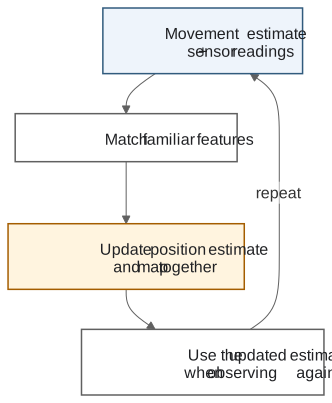 SLAM uses movement estimates and sensor readings to match familiar features, update position and map together, and repeat with the updated estimate.
An educational illustration of the SLAM process. The returning arrows show that the map and position estimate keep informing the next update.
There is another useful clue: coming back to somewhere familiar. Suppose the robot travels around a corridor and returns to the doorway where it started. Its movement estimate may put it slightly away from that doorway. Recognizing the same place adds another clue that can help correct the recorded journey and map. This is called loop closure. Cartographer's documentation explains how these connections help correct a map.
Recognition can be wrong — similar-looking corridors are a real challenge. A SLAM system has to check the match, rather than treating every familiar-looking scene as proof. SLAM Toolbox's documentation describes scan matching and loop-closure processing.
SLAM provides a map and a position estimate. A separate navigator uses them to choose a route; the robot's movement and safety systems still decide how to carry it out.
See the idea in motion
This optional MathWorks demonstration shows lidar-based mapping. The examples use MATLAB; the animation is useful for seeing how sensor observations form a map.
Open the demonstration on MathWorks if the embedded player is unavailable.
How we plan to add SLAM to ECITON-R
This is a proposed implementation path. The current release does not run SLAM. We'll build on the working single-rover map before extending it to a team.
- Make the simulator's clues imperfect. Give the robot noisy distance readings and a rough movement estimate. The robot would plan from its own estimate. We could compare that estimate with the hidden true position to see how mistakes accumulate without giving it the answer.
- Connect a SLAM system to those clues. Start with an experiment using flat, top-down maps and distance scans. An existing system such as SLAM Toolbox is a candidate to evaluate. It would estimate the robot's position and build the map from observations. The choice of software and sensors still needs testing.
- Make corrections visible. Show the estimated position, how sure the system is about it, and map changes in the inspector. Let someone watch a return to a familiar doorway and see whether the estimate improves. Check wrong matches, missing sensor readings, and safe behavior when localization becomes uncertain.
- Keep each system's job clear. On a physical robot, the robot's own SLAM and navigation software would supply map and position information through an adapter — the interface to ECITON-R. ECITON-R would use permitted information for task and communication decisions. The host robot would keep control of movement and safety. Nav2's official SLAM tutorial shows how mapping and navigation can work together.
- Share maps only when they can be aligned. Two robots may each call their starting point the map's centre. One map may need to be moved or turned to line up with the other before discoveries can be combined. Updates would retain who observed them, when, and how uncertain they are, and would pass through the modeled communication limits and delivery checks.
The useful connection is simple: better estimates help a robot make sense of its own observations; carefully shared observations can later help the team. Getting that relationship right is the reason to add SLAM in stages.
In a workbench running Swarm Lab 0.8.0, choose Map exploration, press Run, and use Robot knowledge to follow the map as it grows.